Work in progress…
SharePoint Embedded can be confusing at first because it uses SharePoint technology, but it does not work like the SharePoint sites most Microsoft 365 administrators are familiar with.
Instead of creating a traditional SharePoint site and asking users to work with documents there, SharePoint Embedded allows an application to use Microsoft 365 as its document storage platform. The application controls the user experience, while SharePoint provides the underlying content storage, security, compliance, and Microsoft 365 integration.
This article explains SharePoint Embedded from a Microsoft 365 administrator and engineer perspective, including its architecture, containers, permissions, Microsoft Graph integration, governance, and practical use cases.
How much is SharePoint Embedded
First of all – as per Microsoft – “The SharePoint Embedded partition doesn’t count against Microsoft 365 storage entitlements; it’s billed separately through an Azure subscription on a pay-as-you-go, metered model based on storage and API usage. See Choose a billing model and Billing meters.”
So SharePoint Embedded is not free and is not included with regular Microsoft 365 licenses.
You can try it before buy it using Trial container type to explore SharePoint Embedded development without linking an Azure billing profile, and it’s done via vs code or Graph API, there is no GUI.
SharePoint Embedded Admin Roles and Permissions
Second – there is a dedicated “SharePoint Embedded Administrator” role required to administer SharePoint Embedded. Regular “SharePoint Administrator” role does not administer SharePoint Embedded apps or containers.
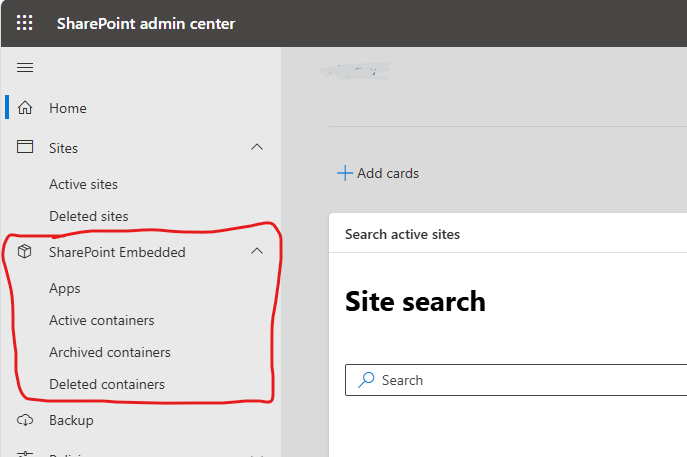
Administering happens under SharePoint admin center, and here is what a SharePoint Admin plus SharePoint Embedded Admin can see (if you got just a SharePoint Embedded Admin role – the only you’d see is what circled red – SharePoint Embedded Apps and Containers).
With respect to app registrations
FileStorageContainerType.Manage.All delegated permission (app-only access isn’t supported):
– Allows the application to manage file storage container types on behalf of the signed in user. The user must be a SharePoint Embedded Admin or Global Admin.
– Allows to create a trial container type (No admin role required for the calling user)
SharePoint Embedded Admin Roles and Permissions
SharePoint Embedded App Users
User of an application that under the hood uses SharePoint Embedded functionality:
- must have an identity in tenant (users accessing SharePoint Embedded containers authenticate through Microsoft Entra ID): either a Member or a Guest brought into the tenant through Entra B2B
- Does not need a Microsoft 365 license (however, if the application also exposes other Microsoft 365 services, those services can have their own licensing requirements)
SharePoint Embedded Ownership
What Does the SharePoint Admin Actually Manage
The SharePoint team (especially in large environments with separated responsibilities) probably does very little provisioning for SharePoint Embedded. Whoever needs SharePoint embedded – deal with IdM to register an application, billing to establish billing, and the application owns creation and day-to-day use of containers through Microsoft Graph. Microsoft describes a container as normally managed by the application, while administrators handle governance operations.
So the SharePoint admin/team still has an important role: platform governance, visibility, lifecycle management, configuration, and troubleshooting/escalation.
Specifically:
Governance: lifecycle, SharePoint controls, compliance integration.
Operations: administrative actions, archive/restore/delete, configuration changes.
Support: troubleshooting SharePoint Embedded containers and determining whether an incident is SharePoint, application, identity, or another platform.
SharePoint Embedded Governance
SharePoint Embedded governance is the management of the SharePoint-specific controls and lifecycle of content stored by applications, rather than governance of the applications themselves.
SharePoint administrators should establish governance around:
1. Container lifecycle
How containers are archived, restored, deleted and permanently removed.
2. Administrative intervention
When SharePoint administrators are allowed to modify containers outside the application.
3. Security and compliance integration
How SharePoint Embedded content participates in existing sensitivity, retention, DLP, eDiscovery, audit and access-control processes.
4. Application retirement
How Embedded content is discovered and dispositioned when the enterprise application using it is retired.
5. Support and escalation
What the SharePoint team investigates and where the boundary lies between SharePoint, the application, Entra, Purview and other enterprise teams.