In large Microsoft 365 environments, leadership and governance teams often need visibility into collaboration resources owned by a specific organization unit – typically defined by a manager and their reporting chain. Native tools make it easy to inspect a single Team or site, but not to answer a simple question at scale: “What Teams and SharePoint sites are owned by anyone under this leader?” This PowerShell script builds that inventory by expanding a manager’s hierarchy and correlating owners to Microsoft 365 Groups/Teams and their associated SharePoint sites.
It is a very common situation in Microsoft 365 when someone creates a form and the form works perfectly, but then the form stopped working and nobody knows who was (or who is) this Microsoft form owner. Below is how to detect the form owner based only on existing form link. You can find out is it a group or a user.
How to find Microsoft forms form owner
the steps are:
1. Use form link
You can use collaborator form link that looks like: https://forms.office.com/Pages/DesignPage.aspx?FormId=<formId> or responder form link that looks like: https://forms.office.com/Pages/ResponsePage.aspx?id=<formId> (or short one: https://forms.office.com/r/kDKaHDauj7)
so just follow the link (use it in your browser)
2. Open browser developers tool – just hit F12 in browser or select “open developer tool” from menu. Inspect the network traces.
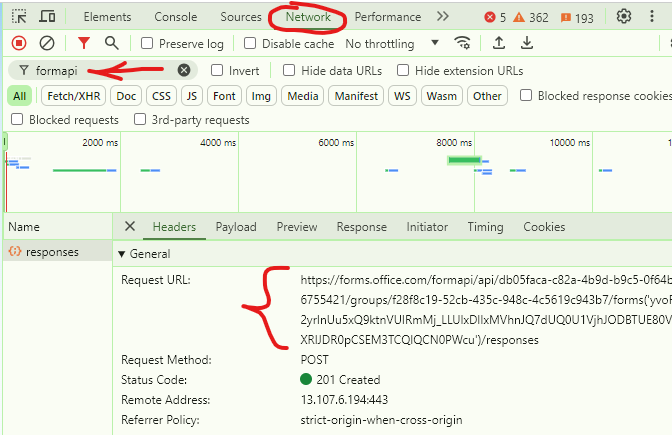
You need to find a request Url that starts with https://forms.office.com/formapi/api/… (you can use filter as below for “formapi”).
You’d refresh your page, or complete and submit the form until this url appears under network traces like this:
3. Then copy request Url to notepad as text. Bingo!
In the url example below: https://forms.office.com/formapi/api/tc05faac-c82a-5b9d-b0c5-1f64b6755421/groups/f28f8c19-52cb-435c-948c-4c5619c943b7/forms...
The “tc05faac-c82a-5b9d-b0c5-1f64b6755421” id is the form owner’s tenant id “/groups/” indicates that this specific form is owned by group, and the “f28f8c19-52cb-435c-948c-4c5619c943b7” is the owner group id in EntraId
In case the form is owned by user, the Url would look like https://forms.office.com/formapi/api/tc05faac-c82a-5b9d-b0c5-1f64b6755421/users/f6351c57-e247-528e-90ab-5i3d50c235b6 where “/users/” indicates that the form belongs to a user and “f6351c57-e247-528e-90ab-5i3d50c235b6” is the id of the user who owns the form
This hack works also for users who already left the company (account is disabled).
Note: If you have an SSO in your org and cannot find this call under network – try different browser or incognito mode or logging out before the call – as what you need appears at early stages – even before authentication or when you submit the form
Some other tricks:
Having a collaborator or long responder link – I can say the form is owned by a person if the form id is 80 characters length, and the form is owned by group – if the form id is 88 characters length
This PowerShell script pulls all tenant sites and all sites owners. The script require app authentication with Sites.FullControl.All and Directory.Read.All permissions. PnP.PowerShell for PowerShell 7 is used.
The script generates two reports
Owners report: one user per line, include: Site Url, Title, Owner e-mail, name and type
Sites report: one site per line, include: Site Url, Title, list of owners e-mails