Actually, this article is more about “Is it safe to remove all deleted user accounts from all SharePoint sites UIL?”, as managing user lifecycle changes in Microsoft 365 goes far beyond deciding whether it’s safe to remove a single user from an individual SharePoint UIL. In large Microsoft 365 tenants, deleted or inactive accounts – sometimes called orphaned identities – can create clutter and confusion in permissions and UI elements affecting governance clarity, audit readiness. This KBA explains the broader tenant‑scale implications of cleaning up deleted user accounts across all SharePoint sites.
My immediate motivation was researching the ‘User ID Mismatch’ issue in SharePoint and figuring out how to address it proactively across the tenant. Why a dedicated KBA? Because, In isolated cases, it’s generally considered safe to remove a single user from a single SharePoint UI location after their Entra ID account has been disabled or deleted. However, there is no official guidance recommending a tenant‑wide cleanup of all UI entries for disabled or deleted accounts. In fact, when asked why such cleanup might be needed, Copilot typically responds that performing it tenant‑wide is not considered safe.
One of the reasons Copilot says it is not safe is
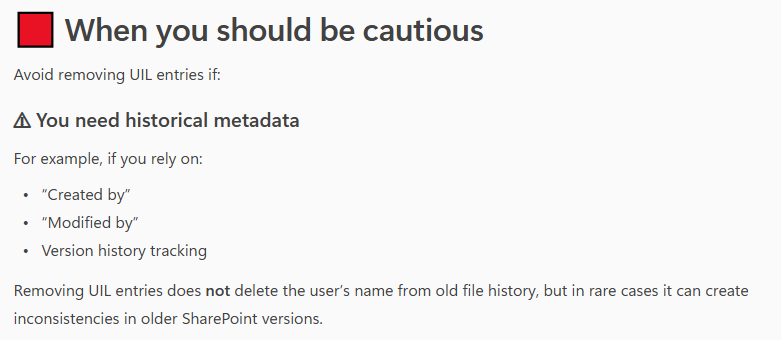
“Avoid removing UIL entries if you need historical metadata
For example, if you rely on “Created by” or “Modified by” or Version history tracking
In my personal experience, removing a user from the UIL does not affect item edit history — the removed user still appears correctly. Moreover, when a new user with the same UPN/email but a different display name is added to a site and begins working on the same document, SharePoint handles this correctly. But let’s test it to confirm or refute this.
I have created 3 new accounts in tenant and provided them with an m365 license:
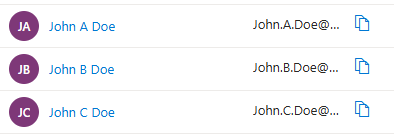
Then created a test site, and all three users one-by-one were working on the site, creating documents, lists, providing permissions
Ensure that “Created by” or “Modified by” and Version history are tracking users correctly:
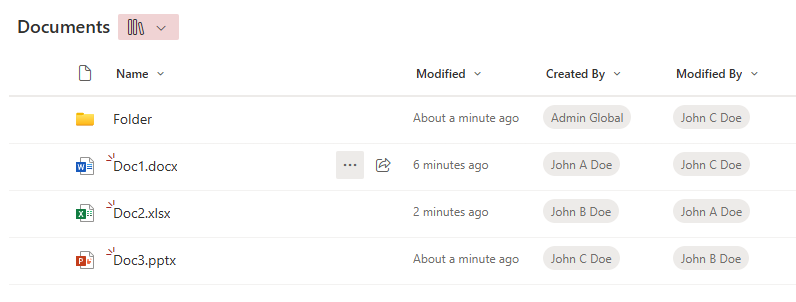
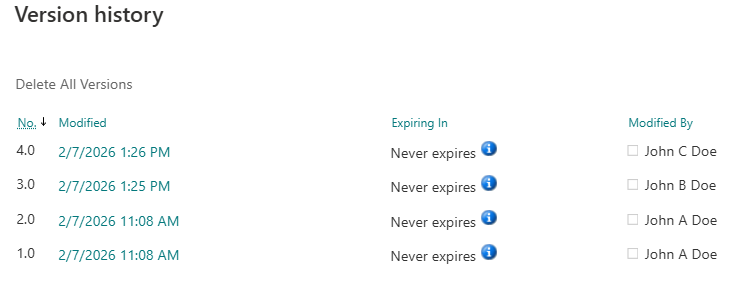
Now let us delicense, disable and delete all three users – John A Doe, John B Doe and John C Doe.
These does not change anything, as users are still in the UIL. Now let me remove all three users from the site UIL. Sources say that “Microsoft has a series jobs to clean-up users after deletion” and “never re-create users within days after deletion, wait at least 30 days.”
So let me check what is happening with “Created by”, “Modified by” and “Version history” after we delete users from the UIL and re-create users with the same UPN and provide access to the site…
| Event | Consequenses |
|---|---|
| User deleted from Entra Id and from UIL | all looks good |
| After a few minutes | all looks good |
| After a few hours | all looks good |
| User John A Dow is recreated with the same UPN (less than 24 hours since deletion), provided with permissions to the site and started working on documents | all looks good |
| After a few minutes | all looks good |
| After a few hours | all looks good |
| User John B Dow is recreated with the same UPN (less than 7 days since deletion), provided with permissions to the site and started working on documents | all looks good |
| After a few minutes, and after a few hours | all looks good |
| User John C Dow is recreated with the same UPN (less than 30 days since deletion), provided with permissions to the site and started working on documents | TBP |
| After a few minutes, and after a few hours | TBP |
So far all looks good, i.e. I’m not seeing any issues.
Proof is below (in the form of screenshots):
Users deleted from Entra Id and from UIL, after a few minutes:
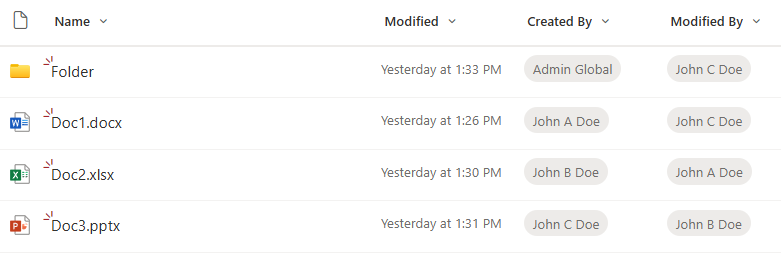
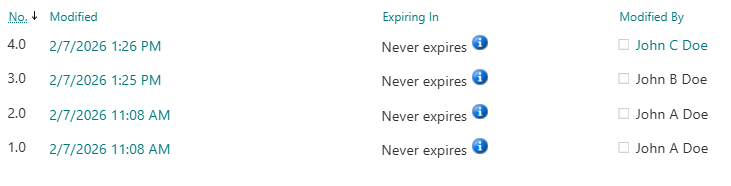
After ~1-2 hours, I created a user with the same UPN “John.A.Doe@vladev.xyz” but with different display name – “John A2 Doe”. A new user requested access to the site, got approval and was able to access the site with no issues, then created a new document. Here is how it looks like:
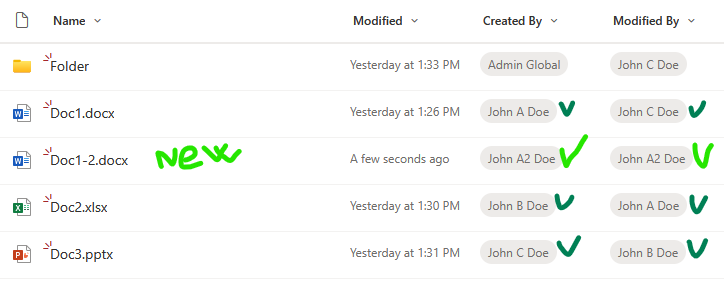
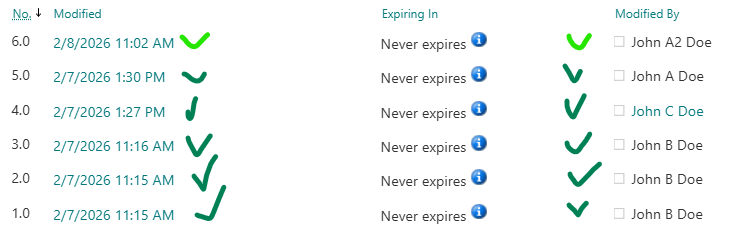
Then a new user – John A2 Doe – updated Doc2. Again, all looks good. An old John.A.Doe and a new John.A.Doe are reflected correctly. Here is the version history:
Let us wait for 24+ hours…
After 10 days I undeleted “John B Dow”. Checked their access to site – permissions are here. Why? It turns out I did not remove the user from the associated Microsoft 365 group. So when I restored (undeleted) account from Entra Id – the account regain groups membership. And after some time the user was able to access the site correctly. I did not expect that, and I’m not sure is it OK. I need to keep this in mind.
Now let me try to undelete “John A Dow” (remember I already created another account with the same UPN). User accounts that you can find under “Deleted Users” have a username like “457be210d0344040a530dc99cfaa2ba6John.A.Doe@contoso.com”.
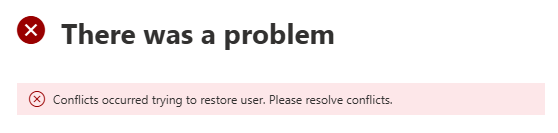
Admin center did not let me undelete this account. The message I got was “There was a problem” and “Conflicts occurred trying to restore user. Please resolve conflicts.”. So that is OK as well.
User Information List (UIL)
In short, User Information List (aka UIL) is a hidden system list that exists in every SharePoint site collection and stores cached profile information about users who have interacted with that site.
The UIL is normally hidden, but you can access it adding the following to the site URL: “/_catalogs/users/simple.aspx”, “/_catalogs/users/detail.aspx” or “/_layouts/15/people.aspx?MembershipGroupId=0”, e.g.
https://<site-collection-url>/_catalogs/users/simple.aspx
https://<site-collection-url>/_catalogs/users/detail.aspx
https://<site-collection-url>/_layouts/15/people.aspx?MembershipGroupId=0
References
- MS tech comm: What are best practices for orphaned users?
- Sharegate: Clean orphan users
- SysKit: Orphaned Users